100% free to start — no credit card required

See everything your AI agents do — and what they cost.

Free local-first observability for Claude Code, Cursor, Copilot, and 4 more providers. Track costs, observe subagent behavior, and optimize spending — all from your terminal. Zero config, zero account, zero cloud dependency.

brew install burnrate-dev/tap/burnrate
Download Binary

Completely free for individual developers — no signup needed. Your code never leaves your machine.

BurnRate

BurnRate

See exactly what your AI coding tools cost you

Check it out on Product Hunt →
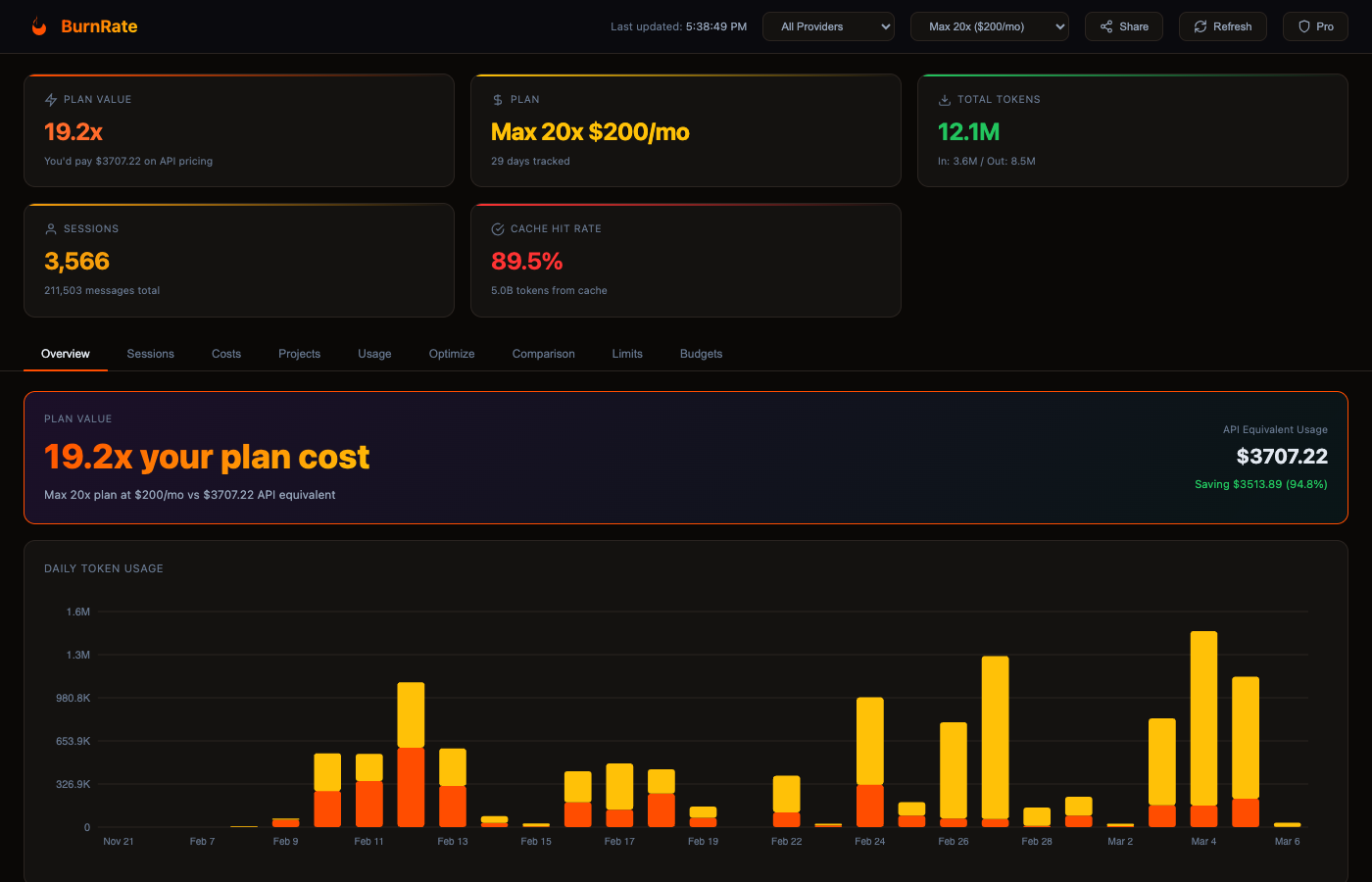
BurnRate Dashboard — Overview showing plan value, cost tracking, and daily token usage

A dashboard built for developers

Nine analytics views to observe your AI agents and understand spending from every angle.

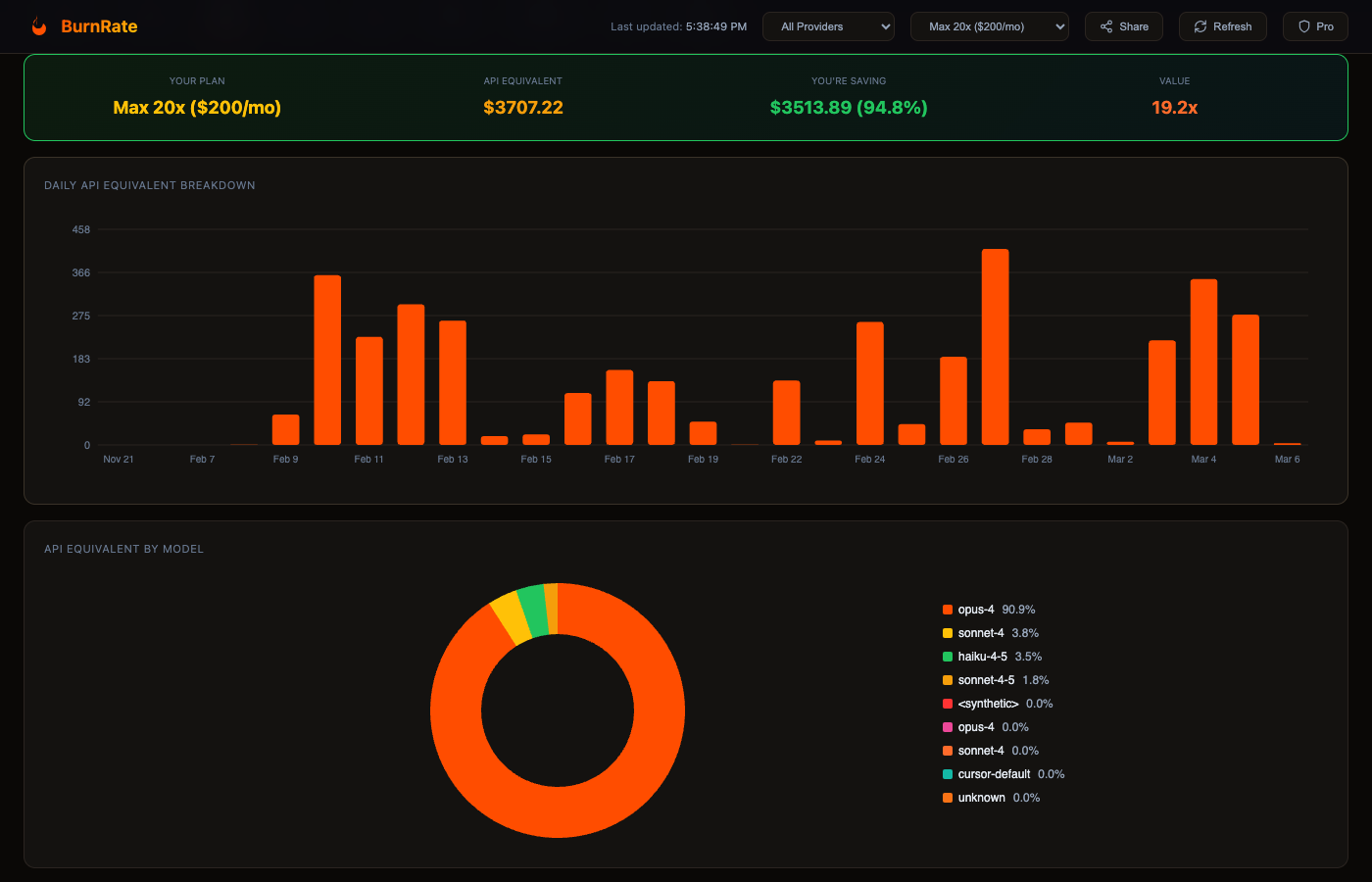
Cost Breakdown & Plan Value

See exactly what your AI usage would cost on API pricing versus what you pay on your subscription. Track daily spending trends and model-by-model cost distribution.

  • Daily API equivalent cost chart
  • Model cost breakdown (donut chart)
  • Plan value multiplier calculation
  • Savings percentage vs API pricing
Cost breakdown with daily trends and model distribution

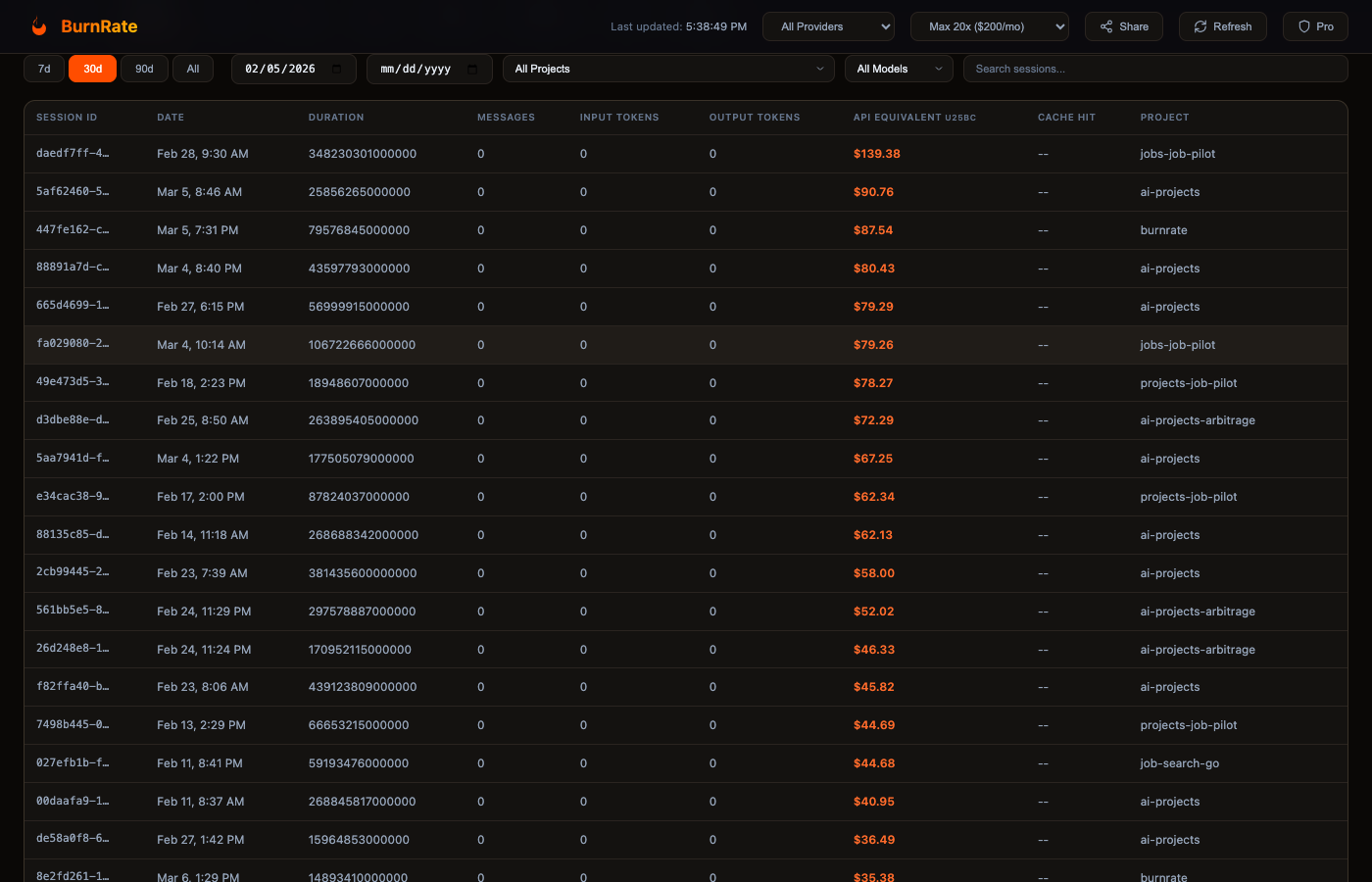
Session Explorer

Browse every AI session with full metadata — duration, tokens, cost, model, and project. Filter by date, project, or model. Sort by any column to find your most expensive sessions.

  • Searchable session history
  • Per-session API equivalent cost
  • Filter by project, model, date range
  • Cache hit rate per session
Session explorer with sortable columns and filters

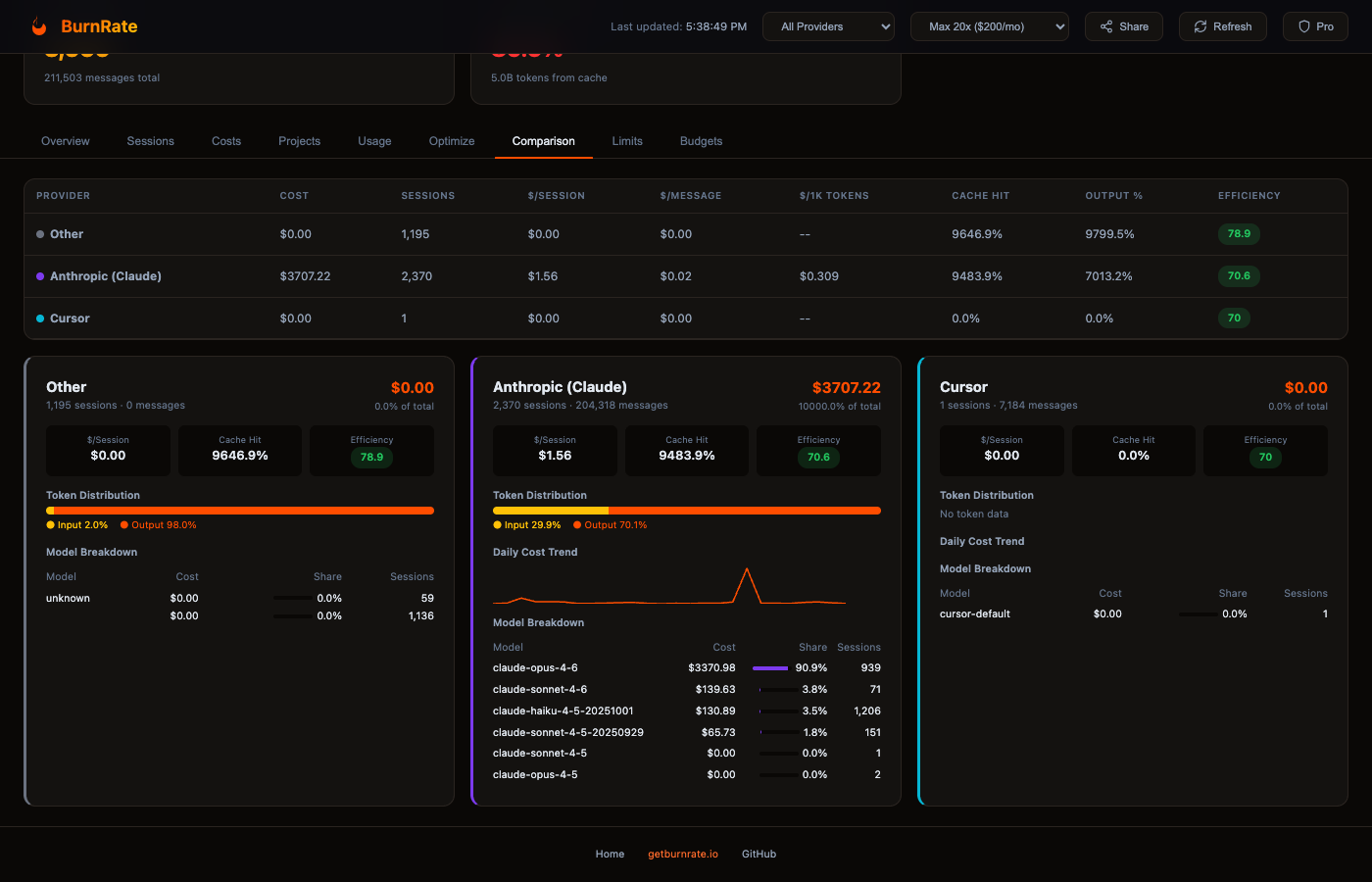
Provider Comparison

Side-by-side comparison across all 7 providers. Per-provider model breakdowns, efficiency scores, token distribution, and daily cost sparklines.

  • Cost-per-session and cost-per-message metrics
  • Efficiency scoring (0-100)
  • Per-model cost breakdown within each provider
  • Daily cost trend sparklines
Provider comparison with model breakdowns and efficiency scores

Optimization Engine

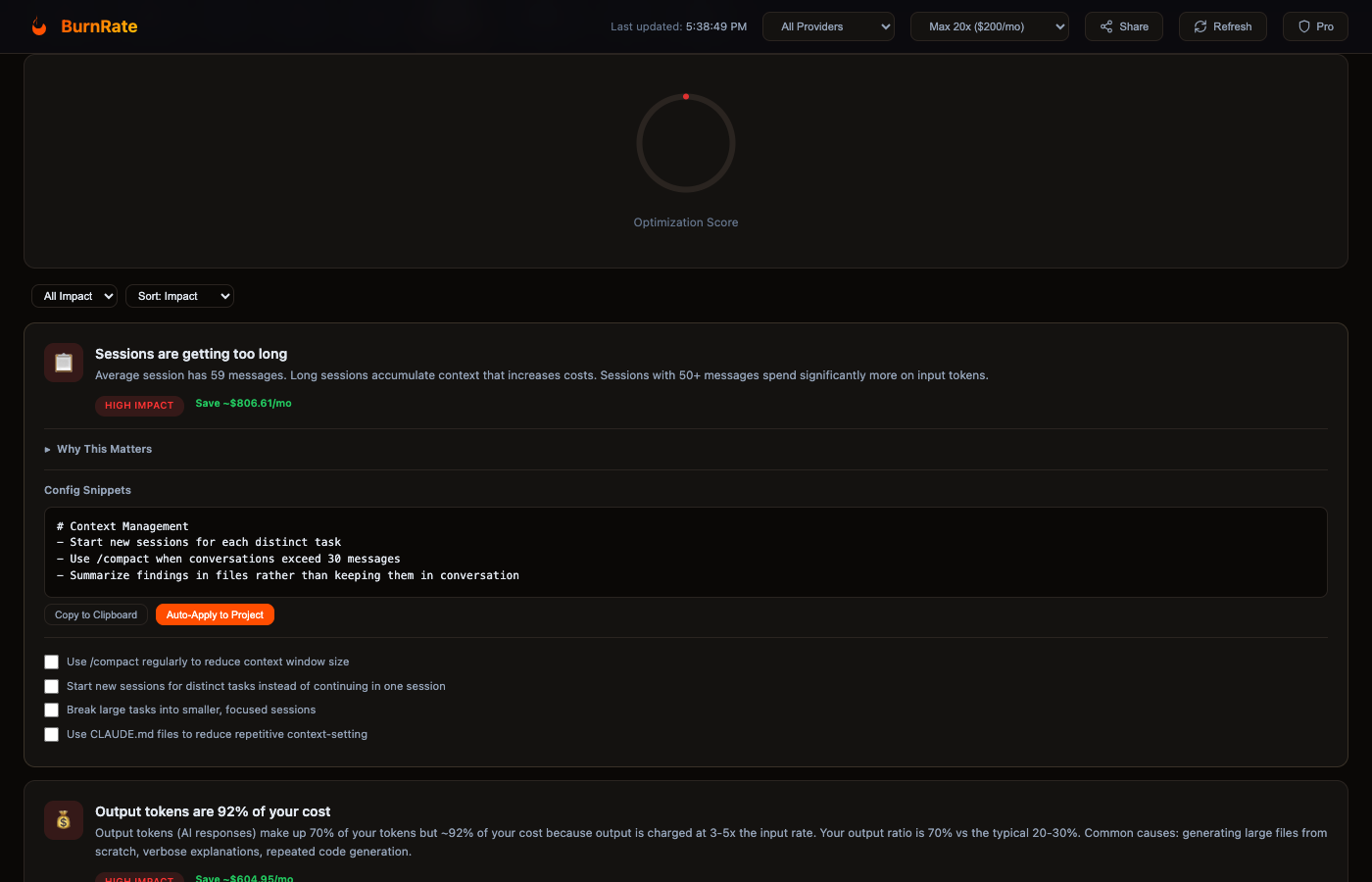
46 rules analyze your usage patterns and suggest concrete, actionable savings — with provider-specific config snippets for each tool. Each rule explains why it matters, how much you can save, and provides one-click config snippets to apply.

  • Impact scoring (high/medium/low)
  • Estimated monthly savings per rule
  • Auto-apply config snippets to CLAUDE.md
  • Educational explanations with real-world analogies
Optimization engine with actionable savings recommendations

Project Analytics

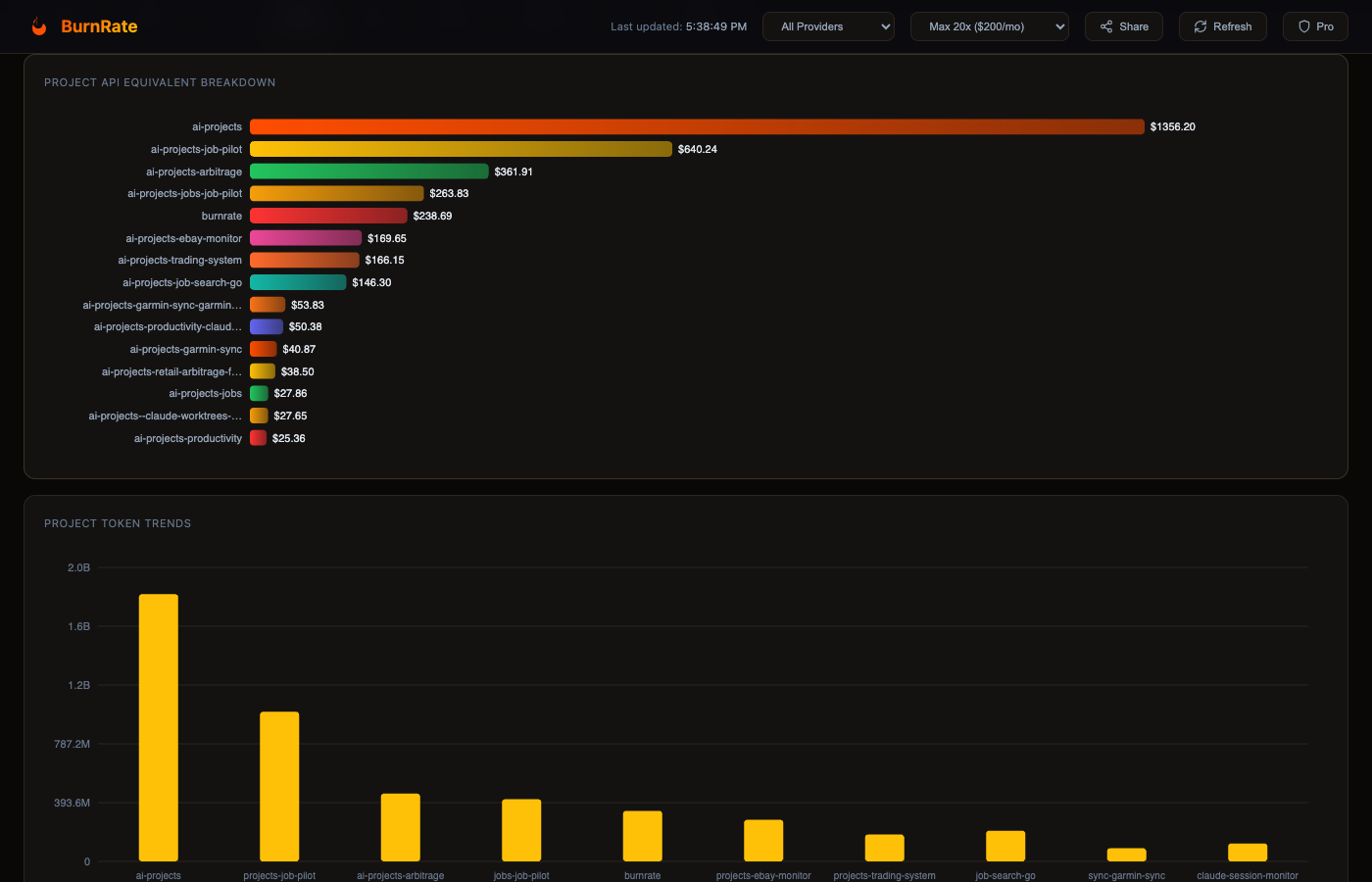
Track costs and usage per project. See which codebases consume the most tokens, set per-project budgets, and identify projects that need optimization.

  • Per-project cost and session counts
  • Project cost ranking charts
  • Budget cap monitoring
  • Cross-project comparison
Project-level cost analytics and rankings

Usage Patterns & Operations

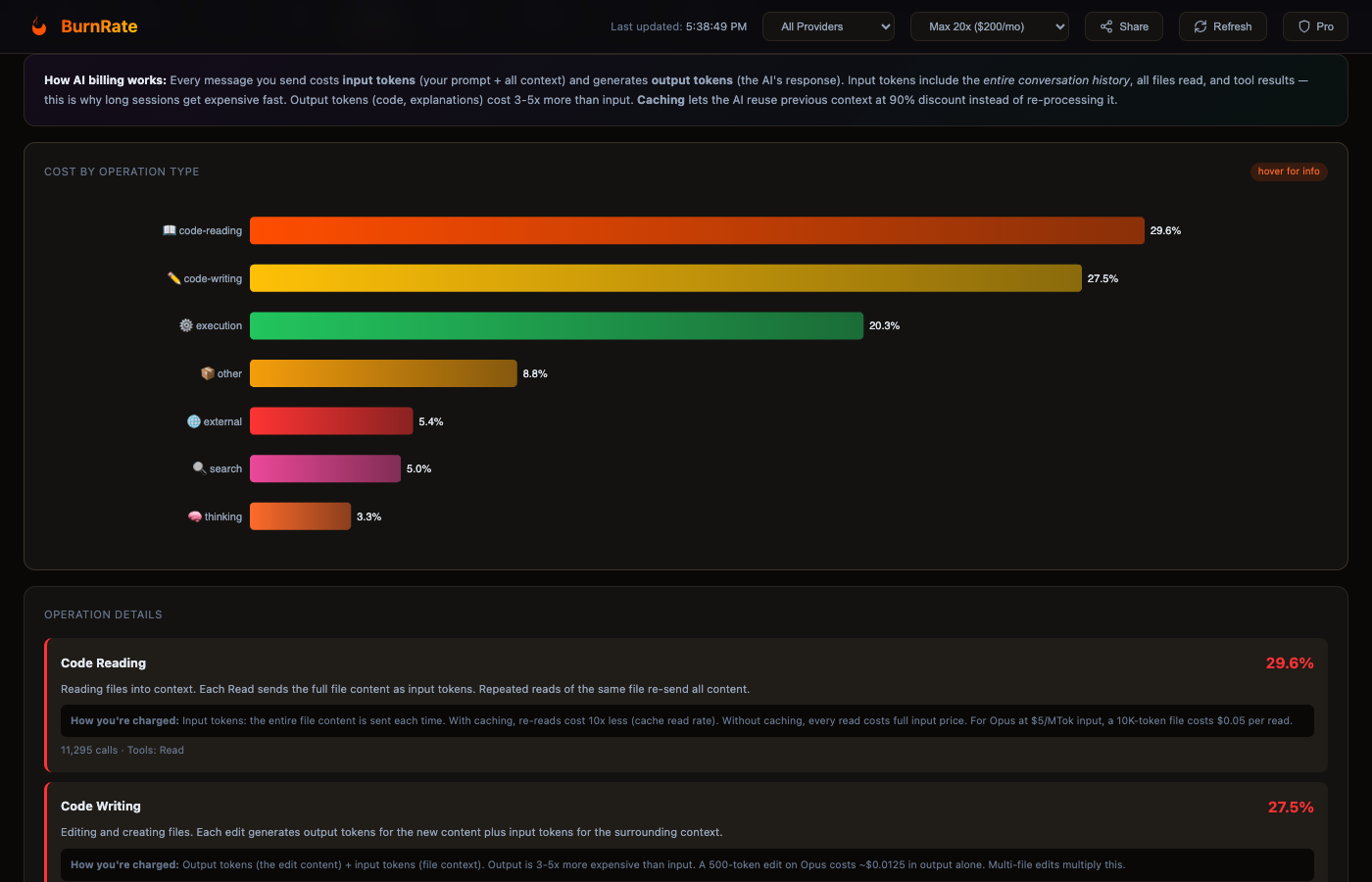
Understand which operations — reading, writing, searching, thinking — consume the most tokens. Identify tool usage patterns and optimize your workflow.

  • Operation-level token breakdown
  • Tool call frequency analysis
  • Context efficiency metrics
  • Session depth distribution
Usage patterns showing operation costs and tool analytics

Rate Limit Monitoring

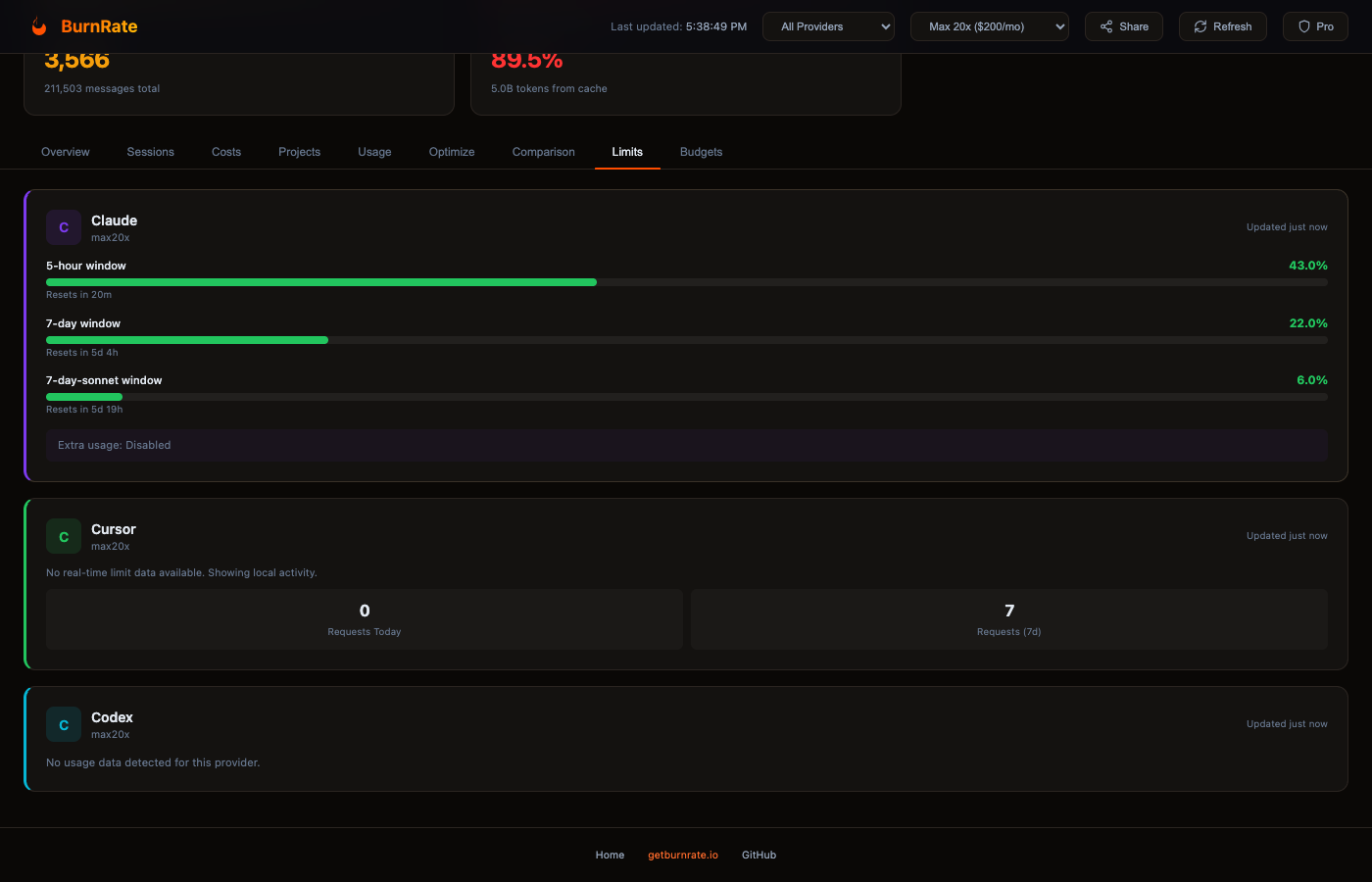
See exactly how close you are to hitting rate limits across Claude, Cursor, and Codex. Live utilization bars with color-coded thresholds and reset countdowns.

  • 5-hour, daily, and weekly window tracking
  • Color-coded utilization (green → yellow → red)
  • Reset time countdowns
  • Multi-provider limit tracking
Rate limit monitoring with utilization bars and reset timers

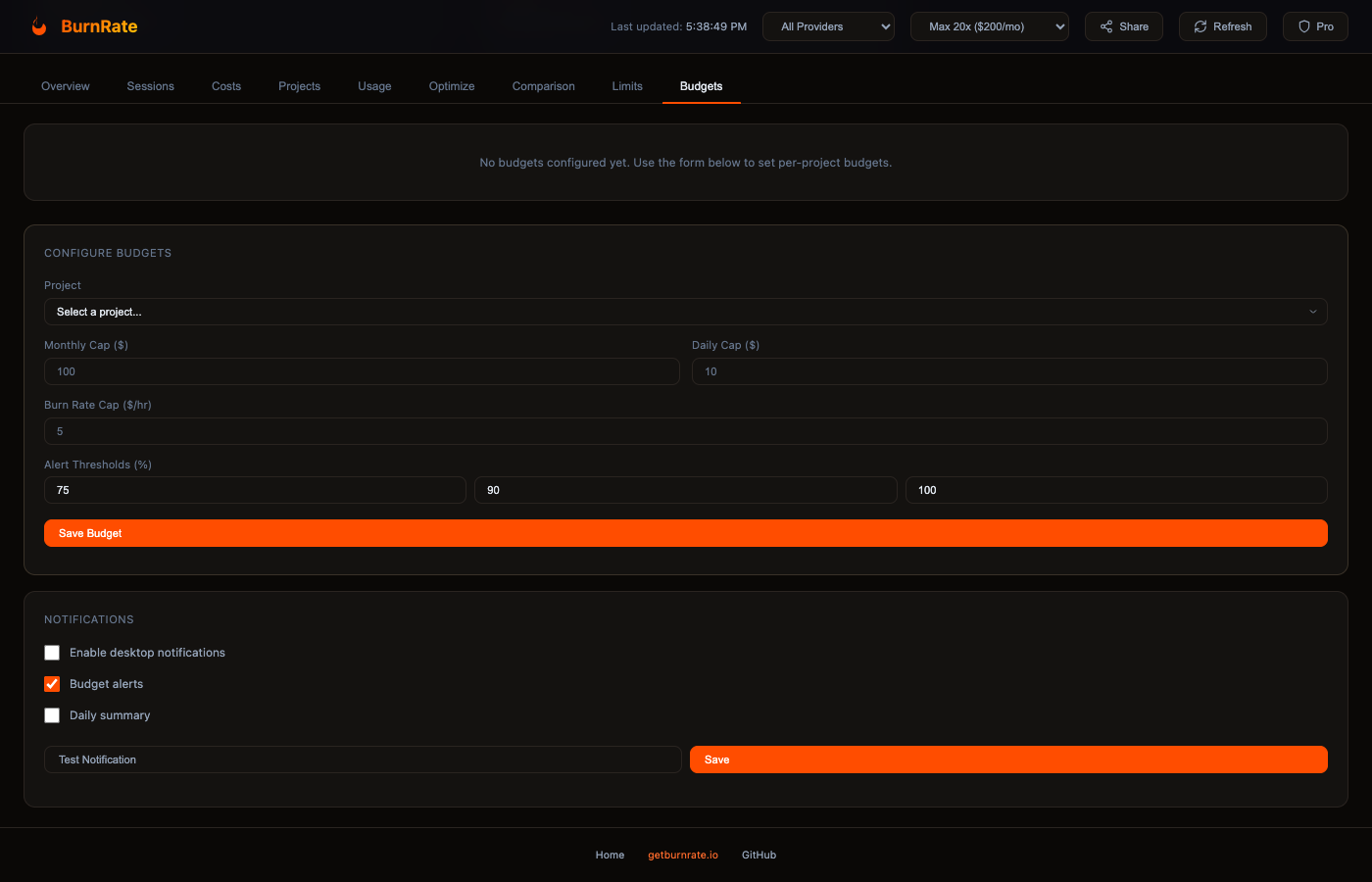
Budget Alerts

Set per-project spending caps and burn rate limits. Get desktop notifications when budgets are at risk. Configure Slack webhooks for team-wide alerts.

  • Per-project monthly and daily caps
  • Burn rate monitoring and projections
  • Desktop and Slack notifications
  • Budget vs actual visualizations
Budget management with spending caps and alert configuration
Works with Claude Code Cursor IDE OpenAI Codex GitHub Copilot Windsurf Cline Aider
46
Optimization Rules
40+
AI Models Tracked
7+
Providers Supported
Real-time
Budget Alerts

Agent observability meets cost analytics

Powerful analytics that run entirely on your machine. See what your agents do, what they cost, and how to optimize them.

Subagent Observability

See every subagent Claude Code spawns — what it costs, what tools it uses, how long it runs. Per-subagent cost trees show exactly where tokens go in agentic workflows. The only tool that provides this — Anthropic closed feature requests #10164 and #10388.

  • Per-subagent cost breakdown
  • Tool call tracking per agent
  • Agent duration and depth analysis
  • Zero config — parses local JSONL automatically

Multi-Provider Analytics

Track Claude Code, Cursor, Codex, Copilot, Windsurf, Cline, and Aider in one dashboard. Compare costs across all 7 providers.

Cost Optimization Engine

46 optimization rules analyze your usage patterns and suggest concrete savings — including provider-specific rules for Claude Code, Cursor, Copilot, Codex, Windsurf, Cline, and Aider. Pro users save an average of $50/mo.

Model Recommendations

AI-powered suggestions for which model fits each project. Stop overpaying for simple tasks.

Operation Cost Breakdown

See exactly which operations -- reading, writing, searching, thinking -- consume the most tokens.

Context Efficiency Analysis

Understand how your context window fills up across sessions. Identify context bloat patterns.

100% Local & Private

Your code and session data never leave your machine. Zero cloud dependency for analytics.

Set Budgets. Get Alerts. Stay in Control.

Set per-project spending caps, burn rate limits, and alert thresholds. Get desktop notifications or Slack webhooks when budgets are at risk.

  • Per-project monthly and daily caps
  • Burn rate monitoring
  • Desktop notifications
  • Slack and email alerts for teams

Plan Usage Limits & Rate Tracking

See exactly how close you are to hitting rate limits across Claude, Cursor, and Codex. Live utilization bars with reset countdowns — never get throttled by surprise.

  • Claude 5h / 7-day / Opus window tracking
  • Color-coded utilization (green → yellow → red)
  • Reset time countdowns
  • Cursor & Codex activity monitoring

Team-Wide AI Cost Intelligence

See how your whole team uses AI tools. Identify high-spenders, optimize provider mix, and set budgets that keep everyone productive.

  • Per-member cost tracking
  • Team budget management
  • Provider consolidation insights
  • Optimization leaderboards

Three steps. Zero config.

Get full agent observability and cost visibility in under a minute.

1
Install
brew install burnrate-dev/tap/burnrate
One command, no dependencies.
2
Analyze
Parses your local AI tool data.
Nothing uploaded, ever.
3
Optimize
Get actionable recommendations
to reduce token waste.

AI coding tools are expensive.
Are you getting your money's worth?

$100/mo
Claude Max

"But how much of that capacity are you actually using?"

$20/mo
Cursor Pro

"Which features drive the most token usage?"

Pay-per-token
OpenAI API

"Do you know your actual cost per coding session?"

The only AI agent observability platform

Anthropic and OpenAI show you a billing page. We show you where every token goes — down to each subagent.

Feature
BurnRate
Anthropic Console
OpenAI Platform
Cursor
Multi-provider tracking
Subagent observability
CLI/IDE tool tracking
Per-project cost breakdown
Optimization recommendations
Model recommendations
Team analytics
Data stays local
N/A
N/A
N/A

Built for Engineering Teams

Give engineering leaders visibility into AI tool ROI without compromising developer privacy

Team-Wide Cost Visibility

See aggregate AI spending across your entire engineering org. Track costs per team, per project, per developer -- without accessing their code.

ROI Measurement

Know if your $100/seat Claude Max licenses are actually being used. Compare actual usage vs subscription costs across the team.

Standardization Insights

Discover which AI tools your team actually uses. Make data-driven decisions about which providers to standardize on.

Privacy-First Architecture

Raw code and session data never leave developer machines. Only aggregated cost metrics are synced to the team dashboard. SOC 2 ready.

How Teams Use It

From install to insights in minutes, not weeks.

1

Admin creates team

Set up your team on getburnrate.io and invite developers

2

Devs install locally

Each developer installs the single binary and enters their team license key

3

Metrics sync automatically

Aggregated cost data syncs to the team dashboard. No code leaves the machine.

4

Optimize team spending

See team-wide analytics, identify optimization opportunities, track ROI

Built for developers who care about agent visibility and AI spend

Enterprise

Everything your organization needs to manage AI tool spending at scale.

SSO / SAML
Dedicated support
Custom integrations
SLA guarantee
Volume discounts
On-premise option

Simple, transparent pricing

Start completely free — no account or credit card needed. Upgrade only when you want deeper insights.

Free
$0
forever
  • Overview, Sessions, Costs tabs
  • 7+ providers (Claude, Cursor, Copilot, Windsurf, Aider, Cline, Codex)
  • 30-day history
  • Basic analytics dashboard
Get Started Free
Pro
$12/month
Save $50+/mo on average
  • Everything in Free
  • 46 optimization rules (provider-specific)
  • Budget controls and notifications
  • Provider comparison dashboard
  • Model recommendations
  • Operation cost breakdown
  • Context efficiency analysis
  • Export to JSON/CSV
Start Pro
Enterprise
Custom
For teams of 50+
  • Everything in Team
  • SSO / SAML
  • Dedicated support
  • Custom integrations
  • SLA guarantee
  • Volume discounts
Contact Sales

Frequently asked questions

Does my data leave my machine?
Never. BurnRate runs entirely on your local machine. Your code, session data, and analytics are computed locally. The only network call is license key validation (Pro/Team), which sends zero usage data.
What is subagent observability?
When Claude Code runs complex tasks, it spawns subagents — child processes that each consume tokens independently. BurnRate parses your local JSONL session data and builds a tree view of every agent and subagent: what tools each one called, how many tokens it used, how long it ran, and what it cost. No SDK, no proxy, no config — it just works. Anthropic closed community feature requests for this (#10164, #10388), so BurnRate is currently the only way to get per-subagent cost breakdowns.
Which AI tools are supported?
Seven providers: Claude Code, Cursor IDE, OpenAI Codex, GitHub Copilot, Windsurf, Cline, and Aider. The plugin architecture makes it easy to add new providers as they emerge.
How does licensing work?
Free tier works without any account. Pro and Team plans use a license key that you enter once. The key validates online every 24 hours with a 7-day offline grace period, so it works on planes and in secure environments.
What does the optimization engine do?
It analyzes your usage patterns across 46 dimensions: output-heavy sessions, context accumulation, session depth, operation costs, duplicate work, cache efficiency, provider arbitrage, budget overruns, and more. Each recommendation includes plain-English explanations, real-world analogies, and specific savings estimates based on your actual usage.
Can I use this at work?
Yes. Since no data leaves your machine, there are no compliance concerns. Team plans add shared dashboards so your engineering team can track AI tool ROI.
What if I cancel Pro?
You keep the Free tier features forever. Your local data is never affected. You just lose access to the advanced analytics tabs and optimization engine.
How does team analytics work?
Each developer installs the BurnRate binary on their machine. It analyzes their local AI session data and pushes only aggregated cost metrics (no code, no session content) to your team dashboard. Admins see per-developer and per-project spending without ever accessing raw data.
Is this SOC 2 compliant?
Our architecture is SOC 2 ready by design. User code and session data are processed locally and never transmitted. The cloud component only handles authentication, billing, and aggregated cost metrics. We're pursuing formal SOC 2 Type II certification.
Do you offer volume discounts?
Yes. Teams of 50+ seats qualify for custom Enterprise pricing with volume discounts, dedicated support, and custom integrations. Contact matt@getburnrate.io.

See what your AI agents are really doing

Start for free — no account, no credit card, no strings attached. Full observability in under a minute.

Download Free
macOS, Linux, Windows · Single binary, no dependencies · Free forever for individuals

Stay in the Loop

Get updates on new observability features, provider integrations, and cost-saving tips. No spam, unsubscribe anytime.